Any 3D file,
made editable.
Drop in an STL, OBJ or STEP file. Remesh3D's AI rebuilds it as a real model with sizes you can change. Click any face and say what to change, then print.
From a frozen file
to a part you can change.
Downloads that are almost right, old prints with no source, a part that broke. Start from the file you already have.
1. Drop your file
Any STL, OBJ or STEP from a download site or your own folder. A quick check says in seconds how well it will rebuild.
2. AI rebuilds it
Real, named sizes you can type over, checked against your file to 0.2 mm.
3. Click a face, say the change
Pick the face you want different and say it in plain words. You see a preview first.
Don't describe it. Point at it.
Click the exact face or edge, then say what you want there. No long descriptions, no guessing which hole you meant.
- add a hole
- round or chamfer an edge
- make a slot wider
- thicken a wall
- turn any length, angle or count into a parameter
Meshes that became models.
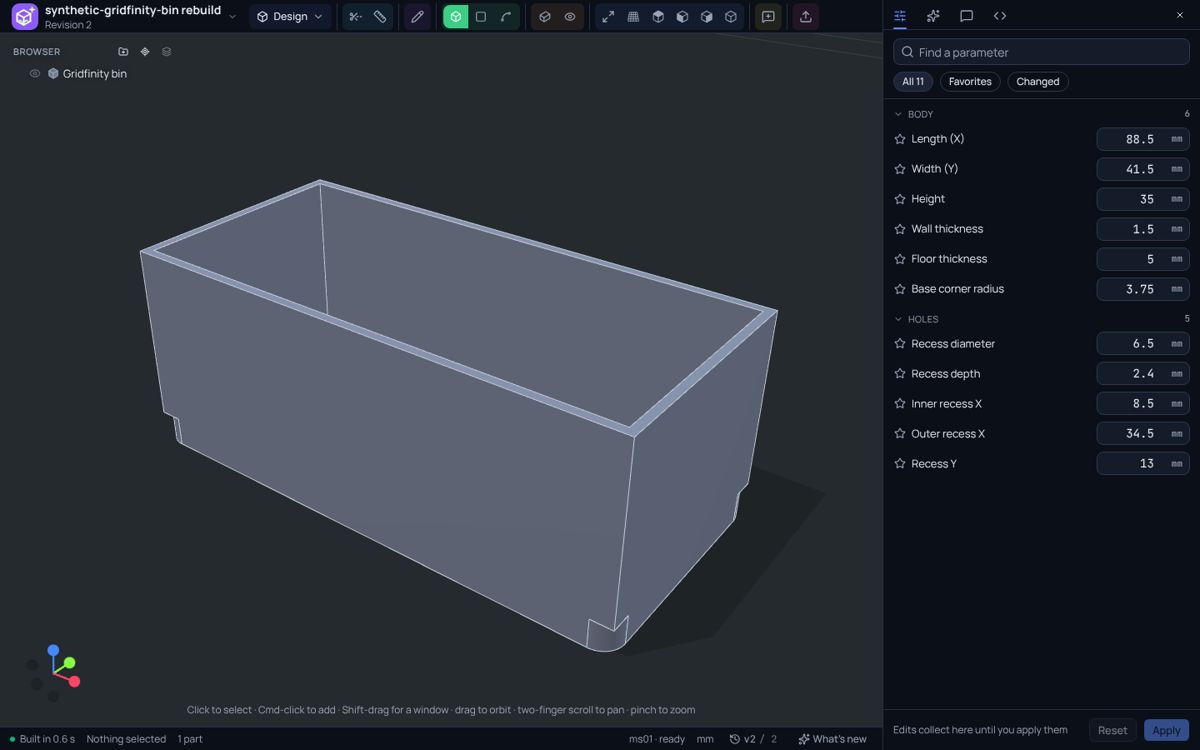
Each one starts as a frozen shape with no sizes and ends as a model with parameters. Hover to see it rebuilt.
Gridfinity bin
frozen shape: no sizes
- slots4
- height42 mm
- magnets6 mm
Fan filter housing
frozen shape: no sizes
- fan120 mm
- screws105 mm
- depth18 mm
Vacuum hose adapter
frozen shape: no sizes
- hose32 mm
- tool38 mm
- length60 mm
Cable organizer
frozen shape: no sizes
- cables6
- cable5 mm
Shelf bracket
frozen shape: no sizes
- arm120 mm
- screwM4
Replacement knob
frozen shape: no sizes
- diameter32 mm
- grip12 ribs
- shaft6 mm
Ready to print. Free to leave.
Your model is a real, closed solid, so it slices cleanly. It also leaves as the steps that built it.
- 3MF with your printer's profile
- STL for any slicer
- Change a number, print again
Print files
For your slicer, with your sizes already applied.
STEP (AP242)
A clean solid with true faces and edges. Opens in FreeCAD, Fusion, SolidWorks and Onshape.
SolidCraft steps
The build history with named parameters. solidcraft-cli rebuilds the part from it.
Build123d code
The plain Python behind the model. Read it, keep it, run it yourself.
STEP carries the shape, not the parameters. The parameters travel in the SolidCraft steps and the code.
A real CAD workspace underneath.
Tools to see your model clearly and check it. No file? Start from a sketch or a sentence. It runs in your browser, and your model is open Build123d code you own.
Measure
Put dimensions on any edge or between any two faces.
Compare
Lay two models over each other and see exactly what differs.
Render
A studio photo of the part in the material you will make it in.
Versions
Every change is saved. Go back to any earlier version.
What it's good at.
A quick fit check tells you in seconds, before anything is rebuilt.
Rebuilds well
- brackets, hooks, mounts
- bins, trays, drawers
- covers and fan parts
- plates with holes and slots
Keeps as it is
- sculpted figures
- embossed text, reliefs
- organic, freeform shapes
- 3D scans of nature
Questions.
Why can't I just edit my STL?
An STL or OBJ is like a PDF. It looks right and it prints, but you can't really change it: there are no sizes inside, only thousands of tiny triangles. Remesh3D rebuilds it as the Word document behind the PDF: a real model with named sizes you can change whenever you like.
Which files can I bring?
STL, OBJ and STEP files. No file at all? Start from a sketch or a sentence instead.
Do I need to know CAD?
No. You change a part by typing a new number, or by clicking a face and saying what you want in plain words.
Will the model match my file exactly?
Usually closely, not always perfectly. Every rebuild is compared with your file and shows where it differs and by how much. Anything that came back wrong, you fix by pointing at it.
What can I take out?
Print files (3MF, STL), a STEP file that opens in FreeCAD, Fusion and SolidWorks, and the steps and code that built the model. Nothing is locked in.
Where do my files go?
Models are built in your own browser, then saved to your account so you can open them again.
Get early access.
We're letting people in a few at a time. Invites open here soon.